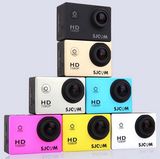
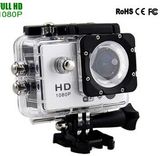
Product Specifications
| Prod Model: |
AC-004 |
| Markets: |
North America,South America,Eastern Europe,Southeast Asia,Africa,Oceania,Mid East,Eastern Asia,Western Europe |
| Capacity: |
1GB, 2GB, 4GB, 8GB, 16GB, 32GB, 64GB, 128GB |
| Image Sensor: |
CMOS |
| Memory Card Type: |
MicroSD/TF |
| Megapixel: |
<5.0MP |
| Screen Type: |
HD Screen |
| Screen Size: |
2-3" |
| Optical Zoom: |
7-10X |
| Video Capture: |
Video Capture |
| Image Stabilization: |
Image Stabilization |
| Red-Eye Reduction: |
Red-Eye Reduction |
| External Flash: |
Without External Flash |
| WiFi: |
Without WiFi |
Product Description
1.1 Features
Underwater: 30M
Video: 720P/30fps, AVI format
Still picture: 2592*1944, JPG format
Status LCD Display
NOTE: The DIGITAL CAMERA MASK will be referred to as the "CAMERA MASK" and CAMERA" and "MASK" throughout this instruction manual.
Disassemble and Assemble
Disassemble: Press and hold the lock button on top of the camera, pull the camera along the groove from the mask.
Assemble: Pull the camera toward along with the groove on top of the mask, and push
Towards left.
3.0 Set Up
3.1 Power On/Off
Power On:
Press and hold the LEFT button for around 3 seconds, the camera will vibrate and the blue indicator on.
Power Off:
Press and hold LEFT button for at least 2 seconds until the blue indicator off and alert ended.
NOTE:
1. We suggest to use CLASS 6 (High speed) Micro SD card for smooth shooting purpose.
Lower CLASS of Micro SD Card may cause video blur.
2. Ensure the camera is dry and powered off before taking out the Cap from the camera.
3. There is only one correct direction to insert the Micro SD card into the slot. Do not force the card into the card slot, as it may damage both the camera and the Micro SD card.
4. A new Micro SD card should be formatted before using.
3.2 Auto Power Off
1. When the built-in Li-battery used up, the blue indicator and red indicator will sprinkle slowly and alternately alarm. Then, camera will auto power-off in about 10 seconds.
2. When the memory is full, the camera will alarm and auto turn off within about 10 seconds.
3. The Camera will auto off when on operation for 3 minutes.
While shooting/recording, do not take out the TF card. Otherwise, the camera will alarm and turn off.
3.3 Charging
1. Charging by PC
Connect the camera to the PC via USB cable. The red indicator flickers and the green light is on when charging is in process. When the battery is fully charged, the indicator will off.
It takes around 3-4 hours to fully charge the battery
2. Charging by A/C adapter
Connect the camera to the A/C adapter, The red indicator flickers and the green light is on when charging is in process. When the battery is fully charged, the indicator will off. It takes around 3 hours to fully charge the battery
Important Note:
The camera requires a specific A/C adapter to charge the battery. Please consult your dealer and choose a correct A/C adapter to charge the camera. Improper A/C adapter could damage the camera/battery.
3.4 Mode Switch
When the camera is on, press LEFT button to switch between the Video Mode and Single Picture Mode.
Video Mode:
The blue indicator is on, recording icon appears on the LCD.
Single Picture Mode:
The red indicator on, shooting icon appears on the LCD.
3.5 LCD Display
On the upper area, the LCD displays the following symbols(from left to right):
"Single Photo" or "Video" (either one when selected),
"Micro SD"
"Battery Level"
On the main area, the LCD displays:
1. In Video mode, 4-digit number appears. It means maximum recording capacity.
The first 2-digit number indicates the "Minute" and the last 2-digit indicates the "second" For example "9960", it means the available time is 99 minutes and 60 seconds.
2. In Single Picture mode, 4-digit number appears. It means the maximum number of picture can be shot. The number will decrease one by one with each shooting.
Note:
The actual number of recording time and Picture depends on the memory capacity.
|
Image Sensor |
1/2.5" 5.0 Mega Pixels CMOS sensor |
Image Resolution
|
Still Image: 2592 x 1944
Video: 720P/30fps |
|
Lens Aperture |
F/2.4 f=3.0mm |
|
Lens |
4G+IR(100 Degree Fov) |
|
Storage Medium |
Micro SD/SDHC(up to 32GB) |
|
Lens Focus |
1.2m to infinity |
|
Display |
Status LCD |
|
Data Format |
Picture: JPEG, Video: AVI |
|
Interface |
USB 2.0 High Speed |
|
Power Supply |
3.7V/600MAH Li-Battery |
|
Weight |
306 (Camera 86g, Mask 220g) |
|
Dimensions |
Camera:14.1cm*3.8cm*3.6cm |
|
|
Mask:19.5cm*8.7cm*7.0cm |
Shenzhen Topfine Technology Co., Limited was established in 2007. Our company is dedicated to becoming a top industrial manufacturer of mobile storage products and digital related products in manufacturing and sales industry. Currently, our company is a professional manufacturer integrating manufacturing and sales. Our firm mainly produces all kinds of USB flash drives, SD/Micro sdcards, etc. We provide OEM & ODM, wholesale and agency services and the products are exported to more than 10 countries and regions, such as Southeast Asia, the Middle East, the United States and Western Europe.
Main products: USB Flash Drive, USB, Key shape USB Drive, Rubber gift USB USB flash drive, USB flash disk, USB flash memory, USB disk, USB drive, USB flash, USB pen, USB memory, Micro SD card, Smartband, Bluetooth Speaker, MINI speaker, Digital photo frame, Tablet PC, Power Bank.
Our company, which is located in Shenzhen, China, has more than 10 experienced engineers, excellent technicians and sales talents. With an area of 1200 square meters, our company possesses 200 employees and has many SMT production lines and perfect test equipment. Thus we have strong technical force, rich production specifications and samples. Our firm adheres to the principle of "Quality first, Clients first" and the business belief of "faithfulness, practice and innovation". We follow ISO9002 standard and provide our customers with quality products, perfect services and competitive prices and competitive prices.
We warmly welcome clients' consultation and patronage.